> For the complete documentation index, see [llms.txt](https://hdsd.dnse.com.vn/llms.txt). Markdown versions of documentation pages are available by appending `.md` to page URLs; this page is available as [Markdown](https://hdsd.dnse.com.vn/san-pham-dich-vu/huong-dan-ban-dong-hanh-saco/16.-dnse_huong-dan-saco-dat-lenh-mua-ban-de-dang-ky-khop-lenh-thoa-thuan-khac-thanh-vien.md).
# 16. DNSE\_Hướng dẫn SACO đặt lệnh MUA/BÁN để đăng ký khớp lệnh thoả thuận Khác thành viên
Lệnh thỏa thuận khác thành viên (2 Firm) được phép đặt từ cả bên Mua và bên Bán
## 1. L**ệnh Khởi tạo thoả thuận 2Firm**
### **1.1 SACO đặt lệnh Khởi tạo thỏa thuận 2Firm**
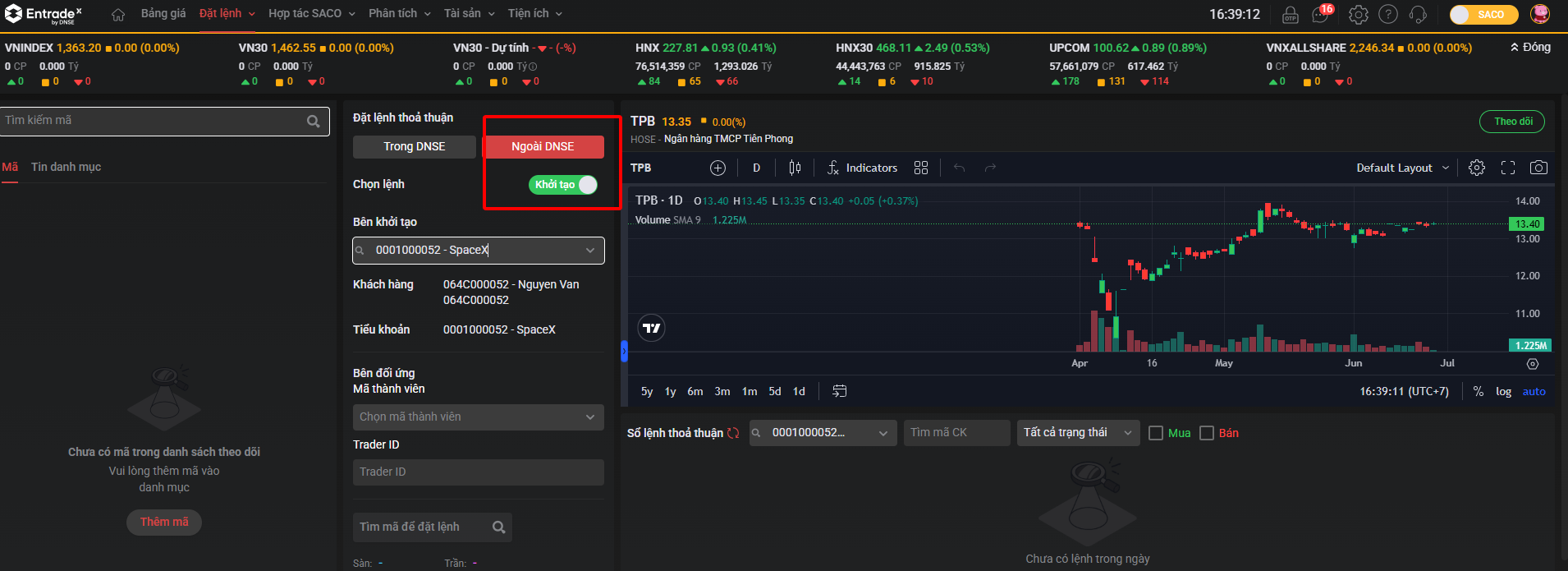
* Tại mục **Đặt lệnh**, chọn **Đặt lệnh thoả thuận** → chọn **Ngoài DNSE** → chọn **Khởi tạo**
* Điền thông tin như ảnh → Đặt Mua/Bán
* Nếu muốn gửi lệnh **Mua** sang Firm khác (mình là bên Mua): chọn **Mua**
* Nếu muốn gửi lệnh **Bán** sang Firm khác (mình là bên Bán): chọn **Bán**
* SACO có thể **huỷ** lệnh MUA nếu lệnh chưa được Nghiệp vụ Duyệt hoặc Từ chối.
### **1.2 SACO check thông tin trên Sổ lệnh**
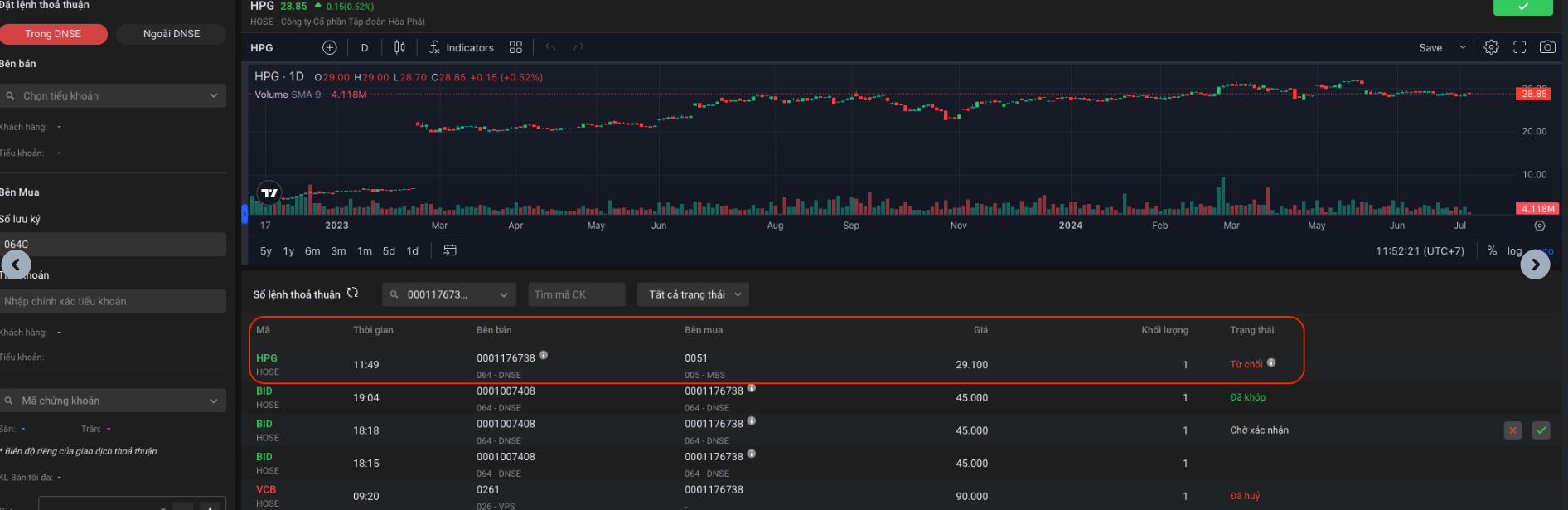
* Sau khi Duyệt / Từ chối, SACO sẽ nhìn thấy lệnh như sau:
## **2. Lệnh ĐỐI ỨNG đăng ký khớp lệnh thỏa thuận 2Firm**
### 2.1. SACO đặt lệnh ĐỐI ỨNG để đăng ký khớp lệnh thỏa thuận 2Firm
Vào Đặt lệnh thỏa thuận -> chọn Ngoài DNSE -> chọn Đối ứng
* Điền thông tin như ảnh, Đặt Mua hoặc Bán
* Nếu muốn khớp với lệnh **Mua** đến từ Firm khác (mình là bên Bán) thì chọn **Bán**
* Nếu muốn khớp với lệnh **Bán** đến từ Firm khác (mình là bên Mua) thì chọn **Mua**
* SACO có thể **huỷ** lệnh đối ứng Chờ xác nhận ( là lệnh chưa được Nghiệp vụ Duyệt hoặc Từ chối)
2.2. SACO kiểm tra thông tin lệnh trên Sổ lệnh
Sau khi lệnh được bên Mua xác nhận và Sở trả kết quả khớp, trạng thái lệnh sẽ chuyển thành “Đã khớp”