> For the complete documentation index, see [llms.txt](https://hdsd.dnse.com.vn/llms.txt). Markdown versions of documentation pages are available by appending `.md` to page URLs; this page is available as [Markdown](https://hdsd.dnse.com.vn/san-pham-dich-vu/huong-dan-ban-dong-hanh-saco/9.-dnse_-huong-dan-saco-gui-yeu-cau-thay-doi-chinh-sach.md).
# 9. DNSE\_ Hướng dẫn SACO gửi yêu cầu thay đổi chính sách
HƯỚNG DẪN BẠN ĐỒNG HÀNH GỬI YÊU CẦU THAY ĐỔI CHÍNH SÁCH
Bước 1: SACO đăng nhập vào tài khoản của mình trên web [Entrade X](https://entradex.dnse.com.vn/dang-nhap?refPath=/) ⇒ chọn **Hợp tác SACO** rồi chọn **Quản lý khách hàng**
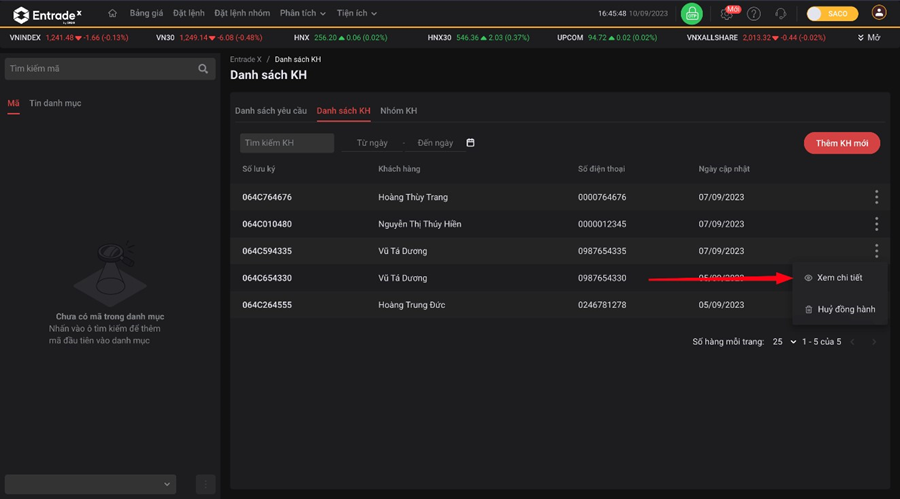
Bước 2: Vào danh sách khách hàng ⇒ chọn khách hàng muốn gửi yêu cầu ⇒ chọn xem chi tiết
* Click vào Icon
* Chọn **Xem chi tiết**
Bước 3: Chọn sản phẩm, Sửa phí theo mong muốn rồi chọn **Xác nhận sửa**
**Lưu ý:**
* Chính sách phí sẽ hiển thị chính sách hiện tại của khách hàng
* Nếu khách hàng chưa đăng ký giao dịch phái sinh sẽ không hiển thị phí phái sinh
Bước 4: Điền OTP
Bước 5: Kiểm tra lại yêu cầu của mình trong trang **Danh sách yêu cầu** và thông báo với khách hàng để xác nhận yêu cầu.