# Kiểm thử chiến thuật

## 1. Tổng quan <a href="#id-1.-tong-quan" id="id-1.-tong-quan"></a>

Giải pháp giúp Nhà đầu tư tạo, kiểm định, triển khai chiến thuật và nhận tín hiệu near-realtime trên cùng một luồng trải nghiệm. Tập trung vào những rào cản phổ biến khi nhà đầu tư muốn biến ý tưởng thành chiến thuật có thể dùng được.

* Hệ sinh thái dữ liệu đa tầng: Kết hợp chỉ báo kỹ thuật, dòng tiền lớn và chỉ số tài chính doanh nghiệp
* Kiểm định chiến thuật trên lịch sử dài: Backtest trên 10 năm để định lượng hiệu quả theo nhiều bối cảnh thị trường
* Không cần code và có thể triển khai ngay: Tạo chiến thuật bằng điều kiện có sẵn, sau đó bật triển khai và nhận cảnh báo near-realtime

🎯 [Kiểm thử chiến thuật](https://entradex.dnse.com.vn/kiem-thu-chien-thuat) (Backtest) giúp NĐT đánh giá hiệu quả của chiến lược giao dịch dựa trên dữ liệu quá khứ, từ đó tối ưu trước khi áp dụng vào giao dịch thực tế.

<figure><img src="https://539770798-files.gitbook.io/~/files/v0/b/gitbook-x-prod.appspot.com/o/spaces%2F-MJ0-9Tzhtqir6mnYmqv%2Fuploads%2FKMtvUlhOfa2I4UOGK90T%2Fimage.png?alt=media&#x26;token=31a708e4-5b46-44ef-b8c0-2f5f9f073472" alt=""><figcaption></figcaption></figure>

## 2. Nâng cấp gói sản phẩm <a href="#id-2.-quan-ly-chien-thuat" id="id-2.-quan-ly-chien-thuat"></a>

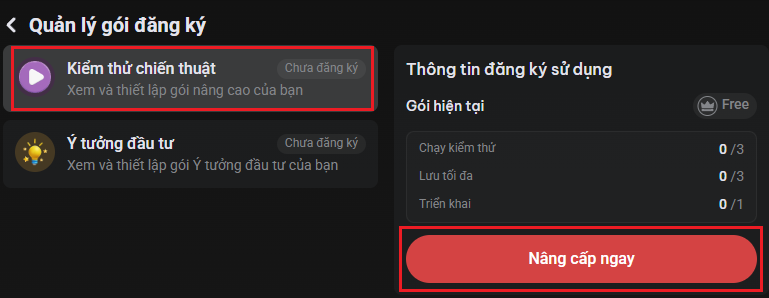
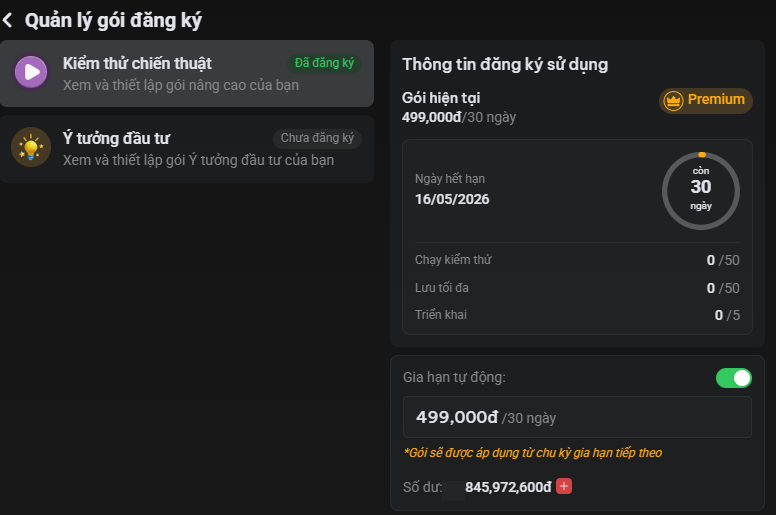
Mỗi tài khoản có <mark style="color:red;">**3 lượt sử dụng miễn phí trong vòng 30 ngày**</mark>, NĐT có nhu cầu nâng cấp lượt sử dụng thực hiện theo hướng dẫn sau:

**Bước 1**: Đăng nhập tài khoản trên [webtrading](https://entradex.dnse.com.vn/kiem-thu-chien-thuat), chọn **Thông tin tài khoản**

<figure><img src="https://539770798-files.gitbook.io/~/files/v0/b/gitbook-x-prod.appspot.com/o/spaces%2F-MJ0-9Tzhtqir6mnYmqv%2Fuploads%2FETeEW5OINDmzA7CImIBP%2Fimage.png?alt=media&#x26;token=15c481a2-b5a1-4163-b29a-33358c8a32c8" alt=""><figcaption></figcaption></figure>

**Bước 2**: Tại trang **Thông tin tài khoản**, chọn **Quản lý gói đăng ký**

<figure><img src="https://539770798-files.gitbook.io/~/files/v0/b/gitbook-x-prod.appspot.com/o/spaces%2F-MJ0-9Tzhtqir6mnYmqv%2Fuploads%2F4vBhjE3YntuYQVaZoVOm%2Fimage.png?alt=media&#x26;token=df96f2bc-1168-412b-8b6a-24a02301ac41" alt=""><figcaption></figcaption></figure>

**Bước 3**: Tại trang **Quản lý gói đăng ký**, chọn sản phẩm **Kiểm thử chiến thuật** -> chọn **Nâng cấp ngay**

<figure><img src="https://539770798-files.gitbook.io/~/files/v0/b/gitbook-x-prod.appspot.com/o/spaces%2F-MJ0-9Tzhtqir6mnYmqv%2Fuploads%2FhpDBwVItazMd9MQSPJXC%2Fimage.png?alt=media&#x26;token=5cb60dc5-647c-4f41-8443-708948440c80" alt=""><figcaption></figcaption></figure>

**Bước 4**: Chọn gói kiểm thử chiến thuật (Basic/Premium) theo nhu cầu -> chọn **Nâng cấp ngay**

<figure><img src="https://539770798-files.gitbook.io/~/files/v0/b/gitbook-x-prod.appspot.com/o/spaces%2F-MJ0-9Tzhtqir6mnYmqv%2Fuploads%2F0PYIHCLt0w4vgrEXHcuQ%2Fimage.png?alt=media&#x26;token=fed7752a-d49d-477b-985f-71812b16d58a" alt=""><figcaption></figcaption></figure>

Chọn **Xác nhận** -> nhập OTP&#x20;

<figure><img src="https://539770798-files.gitbook.io/~/files/v0/b/gitbook-x-prod.appspot.com/o/spaces%2F-MJ0-9Tzhtqir6mnYmqv%2Fuploads%2FElYPN0bIbgZl3fLTkwJW%2Fimage.png?alt=media&#x26;token=c6714ee0-f617-47fd-a633-86c93e621048" alt=""><figcaption></figcaption></figure>

-> Nâng cấp gói thành công

<div><figure><img src="https://539770798-files.gitbook.io/~/files/v0/b/gitbook-x-prod.appspot.com/o/spaces%2F-MJ0-9Tzhtqir6mnYmqv%2Fuploads%2Fn7FXE1vVHNcD4iZfSU7o%2Fimage.png?alt=media&#x26;token=11bd4795-be3a-44b3-8abd-b69b5433bf23" alt="" width="338"><figcaption></figcaption></figure> <figure><img src="https://539770798-files.gitbook.io/~/files/v0/b/gitbook-x-prod.appspot.com/o/spaces%2F-MJ0-9Tzhtqir6mnYmqv%2Fuploads%2FXXF4ezct5BmiWDObkoaS%2Fimage.png?alt=media&#x26;token=e3bb3240-6c71-4c0c-ae2a-d26b14740b1f" alt="" width="563"><figcaption></figcaption></figure></div>

## 3. Hướng dẫn sử dụng

### 3.1 Thông tin chung

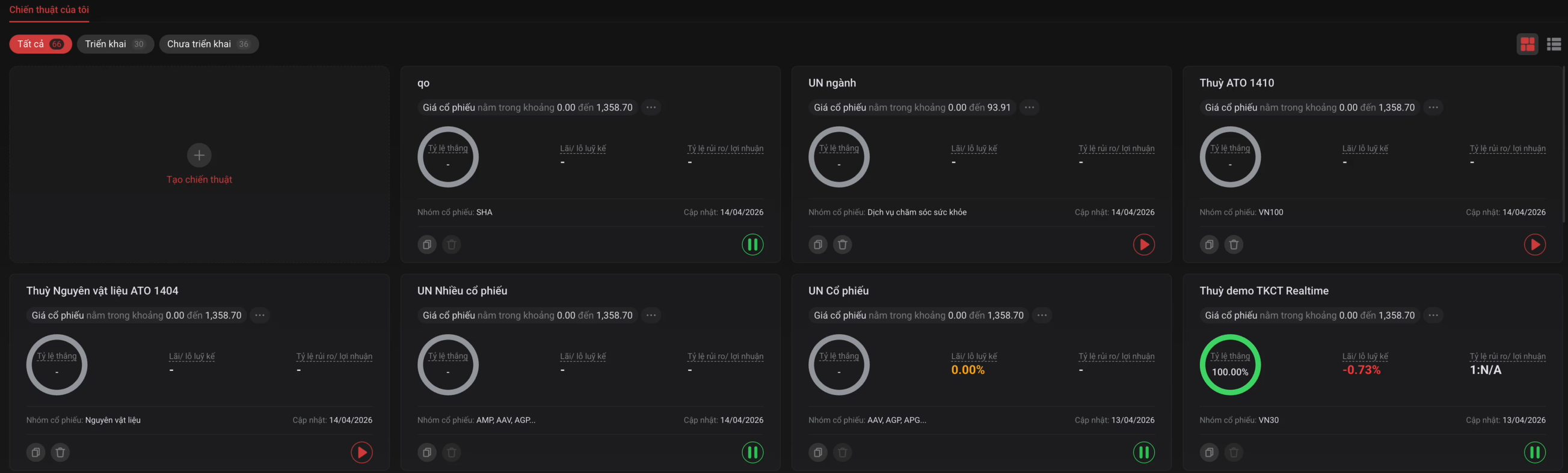
* Tại trang [**Chiến thuật của tôi**](https://entradex.dnse.com.vn/kiem-thu-chien-thuat) có 3 tab: **Tất cả  - Triển khai - Chưa triển khai**

<figure><img src="https://539770798-files.gitbook.io/~/files/v0/b/gitbook-x-prod.appspot.com/o/spaces%2F-MJ0-9Tzhtqir6mnYmqv%2Fuploads%2F030ShX9AjFnWlpgk4FKn%2Fimage.png?alt=media&#x26;token=005b8df2-3f5f-4183-8af9-002513adc5ae" alt=""><figcaption></figcaption></figure>

* Tùy theo trạng thái của chiến thuật (**Triển khai** hoặc **Chưa triển khai**), NĐT có thể thực hiện các thao tác tương ứng nhằm tối ưu quá trình kiểm thử và vận hành chiến lược:

<table><thead><tr><th width="216">Thực hiện</th><th width="120" align="center">Triển khai</th><th width="151" align="center">Chưa triển khai</th><th>Mô tả</th></tr></thead><tbody><tr><td><strong>Triển khai chiến thuật</strong></td><td align="center"></td><td align="center">x</td><td>Kích hoạt chiến thuật để áp dụng vào giao dịch thực tế</td></tr><tr><td><strong>Chỉnh sửa chiến thuật</strong></td><td align="center"></td><td align="center">x</td><td>Chỉnh sửa toàn bộ thông tin cài đặt chiến thuật cá nhân</td></tr><tr><td><strong>Sao chép chiến thuật</strong></td><td align="center">x</td><td align="center">x</td><td>Sao chép toàn bộ cài đặt của chiến thuật, bao gồm tên, nhóm mã, khoảng thời gian và các điều kiện mua/bán</td></tr><tr><td><strong>Xóa chiến thuật</strong></td><td align="center"></td><td align="center">x</td><td>Xóa vĩnh viễn, không hiển thị tại trang Quản lý chiến thuật</td></tr><tr><td><strong>Xem lại kết quả kiểm thử</strong></td><td align="center">x</td><td align="center"></td><td>Xem lại kết quả Backtest của chiến thuật đã triển khai</td></tr></tbody></table>

### 3.2 Hướng dẫn vận hành

Để sử dụng [chiến thuật](https://entradex.dnse.com.vn/kiem-thu-chien-thuat) hiệu quả, NĐT thực hiện theo **2** **luồng** chính:

***⚠️ Chỉ nên Triển khai chiến thuật khi đã hoàn tất Kiểm thử và đạt kết quả kỳ vọng***

<details>

<summary> 🧩 <mark style="color:red;"><strong>Luồng 1: Tạo và Kiểm thử</strong></mark></summary>

**Bước 1**: Đăng nhập vào TKCK -> tại tab **Phân tích** chọn **Kiểm thử chiến thuật**

<figure><img src="https://539770798-files.gitbook.io/~/files/v0/b/gitbook-x-prod.appspot.com/o/spaces%2F-MJ0-9Tzhtqir6mnYmqv%2Fuploads%2FfPW6hatQXnvLnve0OlBg%2Fimage.png?alt=media&#x26;token=e08be483-ee0a-49c6-a239-a174b36072d7" alt=""><figcaption></figcaption></figure>

**Bước 2**: Tại trang **Chiến thuật của tôi** chọn **Tạo chiến thuật**

**2.1 Đặt tên nhóm chiến thuật, chọn khoảng thời gian**

<figure><img src="https://539770798-files.gitbook.io/~/files/v0/b/gitbook-x-prod.appspot.com/o/spaces%2F-MJ0-9Tzhtqir6mnYmqv%2Fuploads%2Fku3IFrs4rzANvoLd30FG%2Fimage.png?alt=media&#x26;token=38594bb5-2b84-4ca8-9213-68fd167355e8" alt=""><figcaption></figcaption></figure>

**2.2 Chọn nhóm mã**: Rổ chỉ số/Cổ phiếu/Danh mục/Ngành

<figure><img src="https://539770798-files.gitbook.io/~/files/v0/b/gitbook-x-prod.appspot.com/o/spaces%2F-MJ0-9Tzhtqir6mnYmqv%2Fuploads%2FtQMs33JantYyo1QD4XZD%2Fimage.png?alt=media&#x26;token=b4b9a009-1d0f-4415-b388-341876d56b56" alt=""><figcaption></figcaption></figure>

**2.3 Thiết lập Điều kiện Mua/Bán**

👉 Chỉ được chọn **tối đa 20 điều kiện Mua và Bán**

2.3.1 Tại **Điều kiện Mua**, click biểu tượng "<mark style="color:red;">**+**</mark>" để cài đặt điều kiện ⇒ chọn <mark style="color:green;">**Áp dụng điều kiện Mua**</mark>

<figure><img src="https://539770798-files.gitbook.io/~/files/v0/b/gitbook-x-prod.appspot.com/o/spaces%2F-MJ0-9Tzhtqir6mnYmqv%2Fuploads%2FI2TVhOMbrF9PEWkUDVjg%2Fimage.png?alt=media&#x26;token=cde98cf9-b82d-4160-9163-7a79825ac1db" alt="" width="563"><figcaption><p>Hình ảnh mang tính chất minh họa</p></figcaption></figure>

* NĐT có thể chọn logic kết nối điều kiện: **VÀ** (default)**/ HOẶC** để áp dụng cho các điều kiện cùng cấp
  * Đối với cấp cha: Áp dụng cho toàn bộ các tiêu chí
  * Đối với cấp con: Áp dụng riêng cho tiêu chí Kỹ thuật

<figure><img src="https://539770798-files.gitbook.io/~/files/v0/b/gitbook-x-prod.appspot.com/o/spaces%2F-MJ0-9Tzhtqir6mnYmqv%2Fuploads%2FXhhxbLgolj3Jigc74ifK%2Fimage.png?alt=media&#x26;token=6198fd17-08dd-4091-bed9-59e0d8b0383b" alt=""><figcaption><p>Hình ảnh mang tính chất minh họa</p></figcaption></figure>

2.3.2 Tại **Điều kiện Bán**, click biểu tượng "<mark style="color:red;">**+**</mark>" để cài đặt điều kiện ⇒ chọn <mark style="color:red;">**Áp dụng điều kiện Bán**</mark>

<figure><img src="https://539770798-files.gitbook.io/~/files/v0/b/gitbook-x-prod.appspot.com/o/spaces%2F-MJ0-9Tzhtqir6mnYmqv%2Fuploads%2Ff6LlOJA6sZPzmknYdLXg%2Fimage.png?alt=media&#x26;token=56de72aa-aeb7-439b-842e-64afa93574d6" alt=""><figcaption><p>Hình ảnh mang tính chất minh họa</p></figcaption></figure>

2.3.3 Hoàn tất cài đặt, chọn **Chạy kiểm thử**

<figure><img src="https://539770798-files.gitbook.io/~/files/v0/b/gitbook-x-prod.appspot.com/o/spaces%2F-MJ0-9Tzhtqir6mnYmqv%2Fuploads%2FOEEZZokC07klGoTkrFvC%2Fimage.png?alt=media&#x26;token=9ad23609-6a57-4942-ba13-3e52c3377c81" alt=""><figcaption></figcaption></figure>

Sau khi chạy kiểm thử, NĐT nhận thấy chiến thuật phù hợp ⇒ chọn **Lưu chiến thuật** để triển khai

<figure><img src="https://539770798-files.gitbook.io/~/files/v0/b/gitbook-x-prod.appspot.com/o/spaces%2F-MJ0-9Tzhtqir6mnYmqv%2Fuploads%2FjY4unH3szENFoiq96UBL%2Fimage.png?alt=media&#x26;token=35b2de0d-399c-4753-914a-0ec567cf6797" alt=""><figcaption></figcaption></figure>

<figure><img src="https://539770798-files.gitbook.io/~/files/v0/b/gitbook-x-prod.appspot.com/o/spaces%2F-MJ0-9Tzhtqir6mnYmqv%2Fuploads%2FPdk1r1HSoOKw9s0haRnc%2Fimage.png?alt=media&#x26;token=0761f0d2-7d1e-4170-b290-4cbb384dfb65" alt=""><figcaption></figcaption></figure>

💥Nếu kết quả chưa đạt kỳ vọng, NĐT có thể tiếp tục điều chỉnh và kiểm thử lại

Khi đã hài lòng với kết quả, chuyển sang [**Luồng 2: Triển khai chiến thuật**](#luong-2-trien-khai-chien-thuat)

</details>

<details>

<summary>🚀 <mark style="color:red;"><strong>Luồng 2: Triển khai chiến thuật</strong></mark></summary>

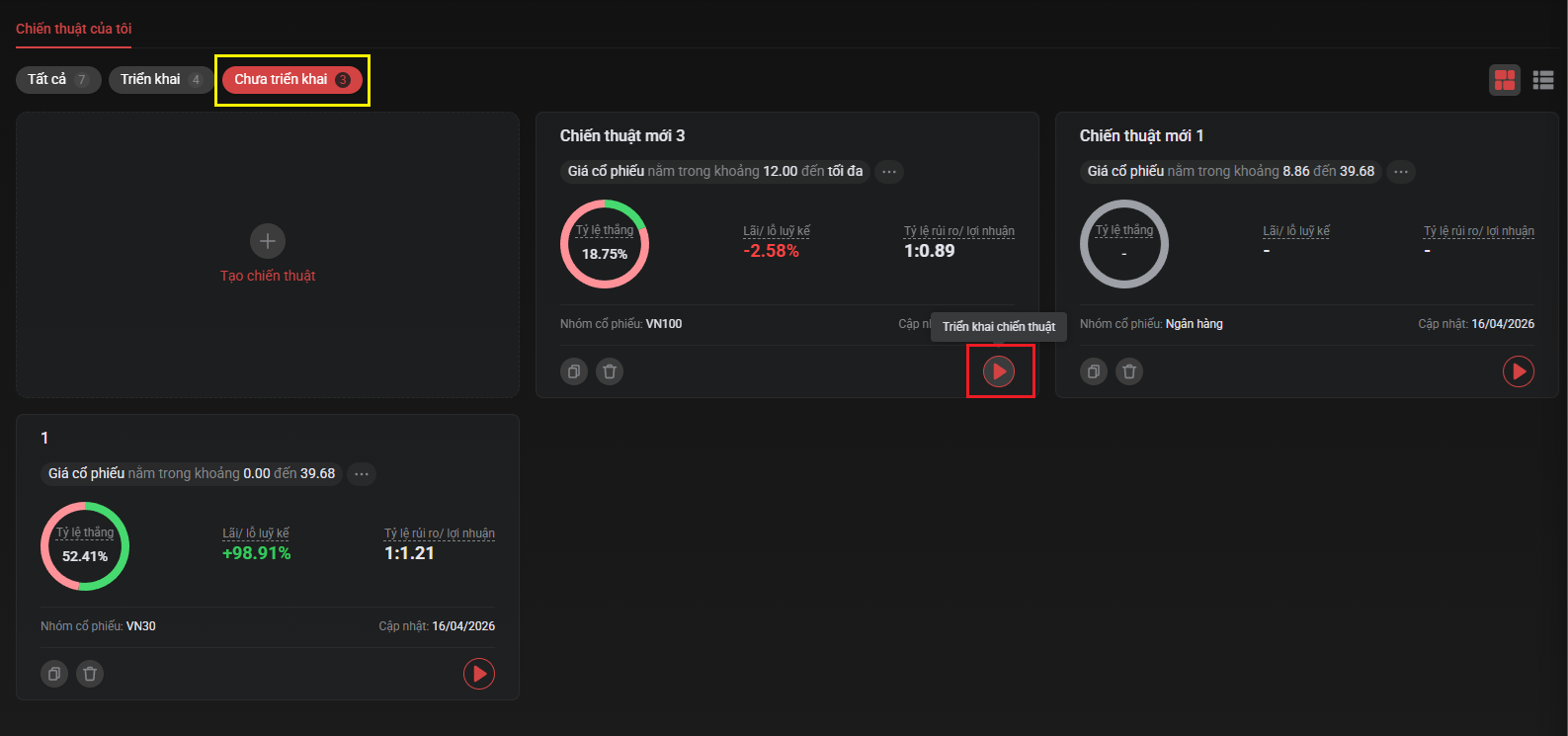
Tại mục **Chưa triển khai**, chọn chiến thuật đã tạo ⇒ chọn **Triển khai chiến thuật**

<figure><img src="https://539770798-files.gitbook.io/~/files/v0/b/gitbook-x-prod.appspot.com/o/spaces%2F-MJ0-9Tzhtqir6mnYmqv%2Fuploads%2FznXgxHax2xO9ixOhHtAz%2Fimage.png?alt=media&#x26;token=aecf1b90-d388-4285-abd0-91f50d8d7ee6" alt=""><figcaption></figcaption></figure>

hoặc NĐT vào xem chi tiết chiến thuật ⇒ chọn **Triển khai chiến thuật**

<figure><img src="https://539770798-files.gitbook.io/~/files/v0/b/gitbook-x-prod.appspot.com/o/spaces%2F-MJ0-9Tzhtqir6mnYmqv%2Fuploads%2FNq3aX3DeKzQBTrbnKcug%2Fimage.png?alt=media&#x26;token=fe07a2ed-4718-41b1-b264-af77e6e06aeb" alt=""><figcaption></figcaption></figure>

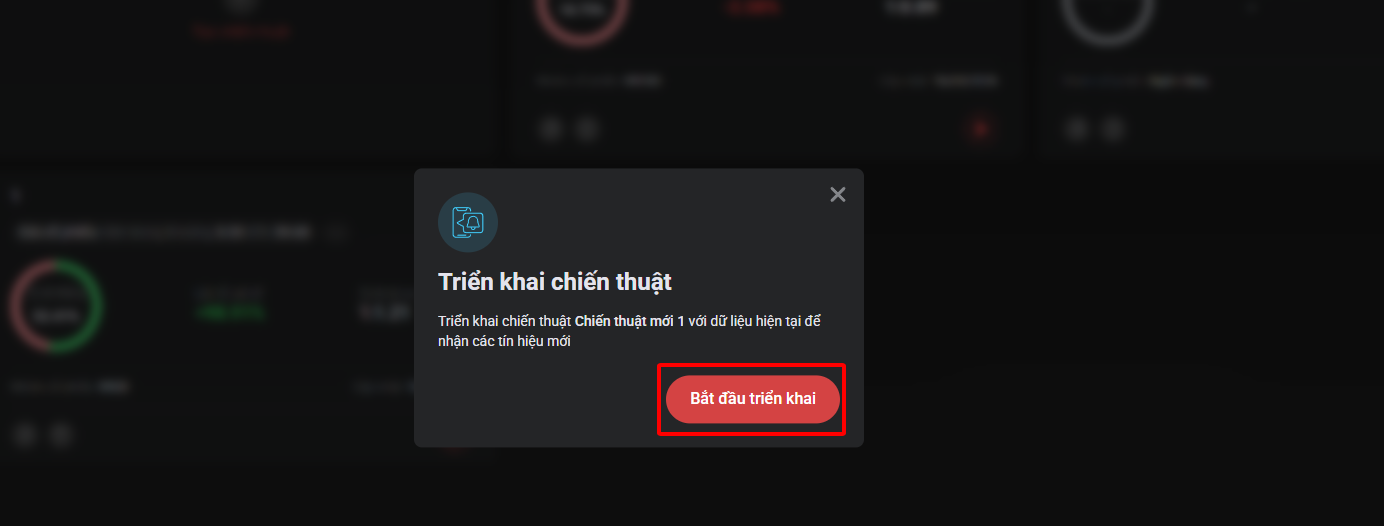
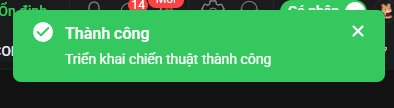
&#x20;⇒ chọn **Bắt đầu triển khai ⇒** Triển khai chiến thuật thành công

<figure><img src="https://539770798-files.gitbook.io/~/files/v0/b/gitbook-x-prod.appspot.com/o/spaces%2F-MJ0-9Tzhtqir6mnYmqv%2Fuploads%2FBbNATdyBA2lctTo0yfiX%2Fimage.png?alt=media&#x26;token=79d7d02e-acd4-4835-a665-0b6f80d81fc7" alt=""><figcaption></figcaption></figure>

<figure><img src="https://539770798-files.gitbook.io/~/files/v0/b/gitbook-x-prod.appspot.com/o/spaces%2F-MJ0-9Tzhtqir6mnYmqv%2Fuploads%2F7MYQB4qxAs93tBLhVbS7%2Fimage.png?alt=media&#x26;token=cb83462e-9bc3-4dd9-b5db-716e2dde9d3d" alt=""><figcaption></figcaption></figure>

NĐT có thể chọn bật thông báo để nhận noti trên app/web khi chiến thuật có thêm các tín hiệu mới

<figure><img src="https://539770798-files.gitbook.io/~/files/v0/b/gitbook-x-prod.appspot.com/o/spaces%2F-MJ0-9Tzhtqir6mnYmqv%2Fuploads%2FKuZZCjHrhFKlrfzFu2wl%2Fimage.png?alt=media&#x26;token=0fdbf396-c4b2-4f83-875e-620d510588fe" alt=""><figcaption></figcaption></figure>

</details>

#### 📊 Quản lý chiến thuật

Sau khi chạy Kiểm thử hoặc Triển khai chiến thuật, NĐT có thể xem lại các thông tin quan trọng như:

* Lãi/lỗ lũy kế - Tỷ lệ rủi ro/lợi nhuận - Tỷ lệ thắng - Phân phối lợi nhuận&#x20;
* Lãi trung bình/deal - Số lượng deal - Lãi nhiều nhất - Lỗ nhiều nhất

👉 Dựa vào kết quả, NĐT có thể hiểu rõ chiến thuật của mình, đưa ra quyết định có cơ sở dữ liệu và giao dịch kỷ luật, hiệu quả hơn

**Bước 1**: Chọn **Quản lý chiến thuật** để theo dõi các chiến thuật đã lưu

<figure><img src="https://539770798-files.gitbook.io/~/files/v0/b/gitbook-x-prod.appspot.com/o/spaces%2F-MJ0-9Tzhtqir6mnYmqv%2Fuploads%2FEmouCC4UtAM6Te2A9joU%2Fimage.png?alt=media&#x26;token=e6b4b84a-3dba-4690-8790-7e630a2d828f" alt=""><figcaption></figcaption></figure>

**Bước 2**: Chọn biểu tượng "**...**" để xem điều kiện chiến thuật cài đặt

<figure><img src="https://539770798-files.gitbook.io/~/files/v0/b/gitbook-x-prod.appspot.com/o/spaces%2F-MJ0-9Tzhtqir6mnYmqv%2Fuploads%2FKko8iYYrn4y0PQYaI6SQ%2Fimage.png?alt=media&#x26;token=ae812a39-8fba-40a2-86d4-a4ef62a8da0e" alt=""><figcaption></figcaption></figure>

Click vào chiến thuật để xem các thông tin chi tiết

<figure><img src="https://539770798-files.gitbook.io/~/files/v0/b/gitbook-x-prod.appspot.com/o/spaces%2F-MJ0-9Tzhtqir6mnYmqv%2Fuploads%2FzBztMN6xL0oCEAZhukRZ%2Fimage.png?alt=media&#x26;token=afd04ada-0567-460f-bcf5-a1b92d6f696b" alt=""><figcaption></figcaption></figure>


---

# Agent Instructions: Querying This Documentation

If you need additional information that is not directly available in this page, you can query the documentation dynamically by asking a question.

Perform an HTTP GET request on the current page URL with the `ask` query parameter:

```
GET https://hdsd.dnse.com.vn/san-pham-dich-vu/kiem-thu-chien-thuat.md?ask=<question>
```

The question should be specific, self-contained, and written in natural language.
The response will contain a direct answer to the question and relevant excerpts and sources from the documentation.

Use this mechanism when the answer is not explicitly present in the current page, you need clarification or additional context, or you want to retrieve related documentation sections.